
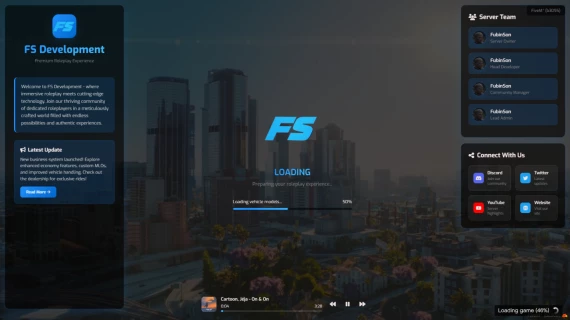
FS Development Loading Screen Features
Elevate your FiveM server's first impression with the FS Development Loading Screen, a fully customizable, visually stunning, and feature-rich solution designed to captivate players from the moment they connect. Below are the key features that make this loading screen the ultimate choice for enhancing your server's appeal and engagement.
1. Customizable Theme Options
- Multiple Color Schemes: Choose from a variety of professionally designed themes (Blue, Cyan, Purple, Green) to match your server's branding. Each theme includes primary, secondary, gradient, highlight, and accent colors for a cohesive look.
- Dynamic Styling: CSS variables dynamically apply your selected theme across all elements, ensuring a seamless and consistent visual experience.
- Branding Flexibility: Easily swap themes via a single configuration change, allowing for quick rebranding or seasonal updates.
2. Immersive Backgrounds
- Video or Image Support: Display a looping background video for a cinematic feel or a slideshow of high-quality images that rotate every 5 seconds to keep the visuals fresh.
- Optimized Visuals: Backgrounds are enhanced with a subtle blur and brightness filter, overlaid with a customizable gradient for a polished, professional appearance.
- Server Atmosphere: Use GTA V-inspired imagery or custom videos to immerse players in your server's world before they even join.
3. Engaging Server Information
- Custom Logos: Showcase your server’s identity with configurable server and main logos, prominently displayed in the left panel and center area.
- Dynamic Text Content: Fully customizable server title, subtitle, description, and announcement text to highlight your server’s unique features and latest updates.
- Call-to-Action Button: A stylish "Read More" button with hover effects encourages players to explore additional server details or announcements.
4. Interactive Progress System
- Dynamic Loading Bar: A sleek, animated progress bar with a shimmering gradient effect visually tracks the loading process, keeping players engaged.
- Custom Loading Messages: Display a sequence of configurable loading messages (e.g., "Initializing connection...", "Loading player data...") to inform players of progress and enhance immersion.
- Completion Feedback: Transitions to a "Ready to connect!" message and a personalized welcome text when loading is complete, creating a warm and inviting experience.
5. Team Showcase
- Staff Profiles: Highlight your server’s team with customizable staff cards, including names, roles, avatars, or initials, fostering trust and community connection.
- Interactive Design: Staff cards feature hover effects and smooth transitions, making the interface feel modern and responsive.
- Easy Configuration: Add or remove staff members via the config file, with support for custom images or fallback initials.
6. Social Media Integration
- Social Links: Promote your server’s community with configurable social media links (Discord, Twitter, YouTube, Website) displayed as interactive cards.
- Branded Icons: Each social link includes a platform-specific icon and color scheme (e.g., Discord purple, Twitter blue) for instant recognition.
- Engagement Boost: Encourage players to join your community platforms with descriptive text and hover animations, driving traffic to your external channels.
7. Built-in Music Player
- Background Music: Enhance the loading experience with a fully functional music player that supports multiple songs, complete with album art, titles, and progress tracking.
- User Controls: Play, pause, skip, or go back to previous tracks with intuitive buttons featuring hover effects for a premium feel.
- Customizable Playlist: Easily configure songs, cover images, and file paths in the config file to match your server’s vibe.
8. Responsive and Modern Design
- Responsive Layout: Adapts seamlessly to various screen sizes, ensuring a flawless experience on desktops, laptops, and smaller displays.
- Modern Aesthetics: Built with the Exo font and Font Awesome icons, delivering a clean, futuristic look that aligns with gaming culture.
- Smooth Animations: Subtle animations like logo pulsing, progress bar shimmering, and hover effects create a dynamic and engaging user experience.
9. Easy Customization
- Single Config File: All settings (themes, backgrounds, logos, staff, social links, music, and text) are managed through a single, well-organized JavaScript config file.
- Multilingual Support: Configure the language and text content to cater to your community’s preferences, with easy-to-update locale settings.
- Developer-Friendly: Clear structure and commented code make it simple for developers to modify or extend functionality.
10. Performance and Compatibility
- Optimized for FiveM: Designed specifically for FiveM servers, with a lightweight codebase that ensures fast loading and minimal resource usage.
- Cross-Browser Support: Built with standard web technologies (HTML, CSS, JavaScript) for compatibility across all modern browsers.
- External Dependencies: Leverages reliable CDNs for Font Awesome and Google Fonts, ensuring fast loading and global availability.
Why Choose FS Development Loading Screen?
The FS Development Loading Screen transforms the often-overlooked loading phase into a powerful marketing tool and immersive experience. It’s not just a loading screen—it’s a gateway to your server’s world, designed to:
- Captivate Players: Stunning visuals and engaging features keep players excited while they wait.
- Strengthen Branding: Customizable elements ensure your server’s identity shines through.
- Build Community: Social links and staff showcases foster connection and trust.
- Enhance Professionalism: A polished, modern design sets your server apart from the competition.
Get the FS Development Loading Screen today and make every player’s first impression unforgettable!.